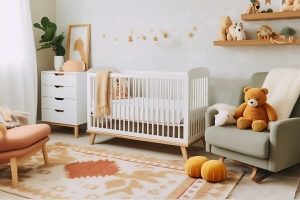
Designing a baby’s bedroom is exciting—but it can also feel overwhelming when safety rules, budget limits, and style choices collide. Many new parents know what they don’t want, yet struggle to translate ideas into a calm, functional space that grows with their child. Online design tools now make it possible to plan, visualize, and personalize a nursery without hiring a designer or making costly mistakes. This guide walks through the most useful digital platforms to help you design a baby’s room that feels thoughtful, safe, and deeply personal.
1: Define your nursery style before buying anything
The fastest way to overspend on a nursery is to shop before you decide on a direction. Pinterest is especially helpful for spotting patterns in colors, themes, and layouts you’re naturally drawn to. The unique move is creating one focused boardjust for the nursery, rather than mixing it with general home décor ideas. Once you see repetition—soft neutrals, woodland themes, minimalist lines—you can commit confidently. Pair this with a simple digital mood board in Adobe Express to lock in colors, textures, and visual references. This upfront clarity prevents impulse buys that don’t work together later.
Style-planning checklist
- One dedicated nursery inspiration board
- 3–4 core colors identified
- One theme or feeling (calm, playful, modern)
- “No list” for styles you want to avoid
2: Use room planners to test layout and safety
A nursery isn’t just about looks—it must function safely and smoothly during late nights. Roomstyler allows you to test furniture placement digitally, helping you visualize spacing before anything is assembled. The unique move is mapping movement paths: crib to changing area, chair to door, storage access with one hand. Avoid crowding the room, even if the furniture looks cute together online. Keep at least one open wall for future changes as your baby grows. Layout tools help you catch problems early, before heavy furniture is in place.
Layout essentials
- Clear walking paths
- Crib placed away from cords/windows
- Storage within arm’s reach
- Space left for future growth
3: Design meaningful wall art instead of buying generic prints
Wall art sets the emotional tone of a nursery, yet store-bought prints often feel impersonal. Adobe Express lets you create custom nursery art using names, birth dates, or gentle illustrations that hold long-term meaning. The unique move is choosing designs that grow with your child—avoid trends tied to infancy only. Soft typography, abstract shapes, or nature motifs age well over time. Export designs in print-ready sizes so frames fit perfectly. Personalized art turns the room into a story, not just a theme.
Wall art tips
- Choose neutral imagery with personal meaning
- Print larger than you think for balance
- Stick to one visual style across pieces
- Use frames that can be reused later
4: Source nursery décor from curated marketplaces
When you want handcrafted charm without custom design work, curated marketplaces help bridge the gap. Etsy offers a wide range of nursery décor—from name signs to mobiles—often made by independent sellers. The unique move is communicating early with sellers about color palettes and room dimensions to ensure a good fit. Save favorite shops rather than just items, so future purchases stay cohesive. Look for listings with real-life nursery photos to understand scale and finish. Marketplaces add warmth and individuality without overwhelming decision-making.
Buying smart
- Confirm materials and finishes
- Ask for mockups when possible
- Save shops by style
- Note production and shipping timelines
5: Keep nursery decisions organized with a simple project hub
Nursery projects quickly sprawl across notes, screenshots, and saved links. Notion works well as a lightweight design hub where you track ideas, purchases, and measurements. The unique move is creating one page for “installed” items so you can see progress and avoid duplicate buys. Track return windows and assembly notes to reduce stress during busy weeks. Add photos once items are placed to guide future adjustments. Organization keeps the nursery project enjoyable instead of exhausting.
Project hub setup
- One page for inspiration
- One page for orders and delivery
- Measurements stored centrally
- Installed items logged
6: Use soft furnishings to add comfort without permanent commitment
Paint and wallpaper feel risky when tastes change quickly, but textiles offer flexibility. Pottery Barn Kids provides nursery-ready textiles designed with safety and softness in mind. The unique move is layering neutral foundations with one or two accent pieces you can easily swap later. Washability matters more than trendiness—check care instructions before buying. Soft furnishings add warmth, reduce noise, and make late-night routines more comfortable. They’re also the easiest elements to refresh as your child grows.
Textile strategy
- Neutral base colors
- Washable fabrics prioritized
- Limited accent patterns
- Easy seasonal swaps
🍼 FAQ — pillow design for new parents
Pillows in a baby’s bedroom are primarily decorative and should be used thoughtfully and outside of sleep spaces. That said, custom-designed pillows can add personality to nursing chairs, shelves, or reading corners while keeping safety considerations in mind. The key is choosing gentle designs, durable fabrics, and sizes that complement the room without clutter. Online tools now allow parents to personalize pillows that match the nursery’s theme without complex design skills. Below are common pillow-design questions new parents ask when finishing a nursery.
How can I design a nursery pillow that matches the room’s theme?
Start by using colors already present in the room—wall art, rugs, or curtains—and carry them into the pillow design. Adobe Express allows you to create a custom pillow design with templates that help with sizing and layout. Keeping designs simple ensures they feel calming rather than busy.
Which platforms are best for ordering custom-designed nursery pillows?
Adobe Express works well for creating the design, while Zazzle and Society6 offer printing and fulfillment with multiple fabric options. Choose based on whether you prioritize design control or material variety.
What pillow sizes work best in a baby’s bedroom?
Smaller decorative pillows work well on chairs or shelves, while lumbar-style pillows add comfort without visual clutter. Oversized pillows can overwhelm small nurseries, so scale matters. Always check product dimensions before ordering.
How do I choose safe-looking fabrics for nursery pillows?
Textured fabrics like cotton or linen blends photograph and wear well while maintaining a soft appearance. Avoid shiny or overly stiff materials that can look out of place in a nursery. Product descriptions usually note fabric weight and feel—read them carefully.
Can custom pillows evolve as the nursery changes?
Yes, that’s one of their biggest advantages. Keep the pillow size consistent and swap covers as the room evolves from infant to toddler. Reusing inserts keeps updates affordable and sustainable.
Designing a baby’s bedroom doesn’t require a designer—it requires clarity, flexibility, and the right digital tools. By planning your style first, testing layouts digitally, and choosing meaningful décor, you avoid costly missteps. Online platforms make it easier to personalize art, source unique pieces, and stay organized during a busy life transition. Soft furnishings and custom accents allow the room to grow alongside your child.